I Switched to the 43Ud79 B and Here is What Happened
In the evolving landscape of professional workspaces, the transition from multi-monitor setups to single, massive canvases has become a defining trend. The 43Ud79 B represents a significant entry in this category, offering a 42.5-inch IPS display designed to replace four 21.5-inch 1080p monitors with a single, seamless 4K panel. For power users, financial analysts, software developers, and creative professionals, the shift to a large-format display is often motivated by a desire to eliminate bezel distractions and streamline desktop management. This article examines the practical realities of integrating the 43Ud79 B into a professional workflow, analyzing its technical performance, ergonomic impact, and overall value proposition for those considering a similar massive leap in screen real estate.
The Philosophy of Workspace Consolidation
Before diving into the specific performance metrics of the 43Ud79 B, it is essential to understand why a user would choose a 43-inch monitor over more traditional 27-inch or 32-inch alternatives. The primary driver is "functional area." While a 4K resolution on a 27-inch screen provides incredible sharpness, it often requires Windows or macOS scaling (typically 150% or 200%) to make text readable. This scaling effectively reduces the usable workspace. On a 42.5-inch panel, the pixel pitch is such that most users can run the display at 100% native scaling. This provides a massive, unencumbered canvas where four full-sized application windows can exist in the corners without overlapping, mirroring the productivity of a quad-monitor array without the physical clutter of multiple stands and cables.
The 43Ud79 B is built on an In-Plane Switching (IPS) panel, which is a critical choice for a screen of this size. At 43 inches, the edges of the screen are often at a significant angle relative to the user's eyes. Vertical Alignment (VA) panels, often found in cheaper large displays or televisions, typically suffer from gamma shift and color degradation when viewed from an angle. The IPS technology in the 43Ud79 B ensures that even the taskbars and toolboxes located at the far corners of the screen remain color-accurate and legible, a necessity for professional color grading or detailed spreadsheet work.
Technical Performance and Visual Fidelity
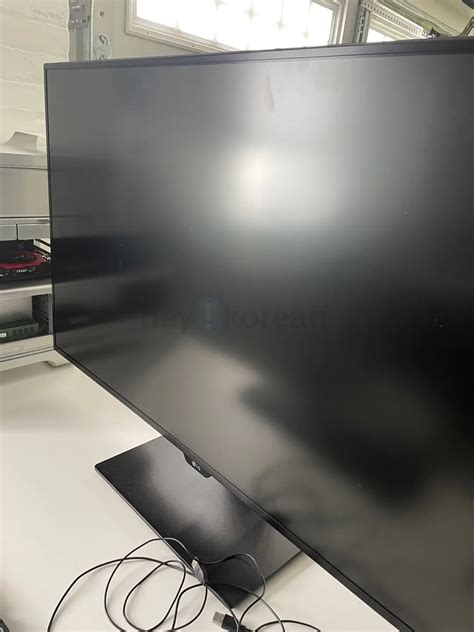
The heart of the 43Ud79 B experience is its Ultra High Definition (3840 x 2160) resolution. With a brightness rating of 350 nits and a contrast ratio of 1000:1, it meets the standard expectations for a high-end office monitor. However, the sheer scale of the display changes how these specs are perceived. Because the screen occupies so much of the user's field of vision, the matte anti-glare coating becomes vital. The 43Ud79 B utilizes a sophisticated coating that minimizes reflections from windows or overhead lights without introducing the "graininess" that plagued earlier generations of matte displays.
Color reproduction is another area where the 43Ud79 B excels for its price bracket. It covers over 99% of the sRGB color gamut, making it suitable for web design, photography, and video editing. While it lacks the high-end HDR capabilities or the wider DCI-P3 coverage found in dedicated cinema displays, it offers a level of consistency that is hard to find in a panel of this size. Factory calibration is generally reliable, though professional users will likely want to use a colorimeter to fine-tune the white point and luminance to match their specific environment.
Connectivity is perhaps one of the most robust aspects of this unit. It features four HDMI ports (two 2.0 and two 1.4), a DisplayPort 1.2, and a USB Type-C port that supports DisplayPort Alt Mode. This allows the monitor to act as a hub for multiple machines. A common real-world use case involves a primary workstation connected via DisplayPort, a laptop connected via USB-C, and various peripheral devices like a gaming console or a secondary NUC connected via HDMI. The inclusion of a remote control further emphasizes its role as a command center, allowing users to switch inputs and adjust settings without reaching for buttons tucked behind the bezel.
Real-World Use Cases: Productivity and Multitasking
For software developers, the 43Ud79 B is transformative. The ability to have a vertically oriented IDE (Integrated Development Environment) on one half of the screen and a browser window, terminal, and Slack on the other half significantly reduces the need for "Alt-Tabbing." The vertical height of a 43-inch 4K screen allows for hundreds of lines of code to be visible at once, which is invaluable for debugging complex logic chains.
Find top-rated Electronics products at great prices.
Shop Amazon →Financial professionals and data analysts find immense value in the 43Ud79 B because of how it handles massive spreadsheets. Viewing a Year-Over-Year comparison with dozens of columns and hundreds of rows across a single panel prevents the "mental break" that occurs when moving data across monitor borders. Furthermore, the 43Ud79 B supports several Picture-by-Picture (PBP) and Picture-in-Picture (PIP) modes. It can display four separate 1080p inputs simultaneously, acting like a hardware-level window manager. For those monitoring live feeds, stock tickers, or security cameras alongside their primary work, this feature is indispensable.
Pros and Cons of the 43Ud79 B
- Pro: Massive Screen Real Estate. The sheer size allows for 100% UI scaling, maximizing the actual usable workspace provided by the 4K resolution.
- Pro: IPS Panel Technology. Outstanding viewing angles ensure that color and contrast remain consistent from edge to edge, which is critical for a screen this wide.
- Pro: Diverse Connectivity. With four HDMI ports, DisplayPort, and USB-C, it can easily handle multiple computers and devices simultaneously.
- Pro: USB-C Integration. The single-cable solution for video and data via USB-C (though limited in power delivery compared to some dedicated docks) simplifies laptop integration.
- Pro: On-Screen Control and Remote. The included remote and software-based menu controls make managing such a large device much more convenient than traditional monitor buttons.
- Con: Ergonomic Limitations. The stock stand offers very little in the way of height adjustment or swivel. Many users will find they need a heavy-duty VESA mount to position it correctly.
- Con: Not for Competitive Gaming. With a 60Hz refresh rate and standard response times, it is excellent for productivity but lacks the high-refresh features desired by professional gamers.
- Con: Power Delivery. The USB-C port does not provide enough wattage to fast-charge high-performance laptops (like a MacBook Pro 16) under heavy load.
Comparison with Typical Display Alternatives
To better understand where the 43Ud79 B sits in the market, it is helpful to compare it against the two most common alternatives: a dual 27-inch 4K setup and a 34-inch Ultrawide monitor.
| Feature | 43Ud79 B (Single) | Dual 27-inch 4K | 34-inch Ultrawide (1440p) |
|---|---|---|---|
| Total Pixels | 8.3 Million | 16.6 Million | 4.9 Million |
| Scaling Needed | Typically 100% | Typically 150% - 200% | Typically 100% |
| Bezel Distraction | None | Significant center gap | None |
| Input Management | 4-way PBP / Remote | Manual per monitor | Limited 2-way PBP |
| Vertical Space | Excellent (21 inches) | Good (13 inches) | Moderate (13 inches) |
While the dual 27-inch setup technically offers more pixels, the "functional" workspace often feels smaller because the items must be scaled up for legibility. The Ultrawide 34-inch monitor offers a cinematic experience but lacks the vertical height required for deep document editing or large-scale data analysis. The 43Ud79 B occupies the "sweet spot" for users who prioritize vertical and horizontal space equally.
A Comprehensive Buying Guide for Large-Format Monitors
Stepping up to a 43-inch monitor is not as simple as clearing a bit of desk space. There are several environmental and technical factors that buyers must consider to ensure the transition is successful.
1. Desk Depth and Eye Strain
The most common mistake when buying a 43Ud79 B is placing it on a standard 24-inch deep desk. At this size, the screen will be too close to your face, causing significant eye strain and requiring excessive neck movement to see the corners. A desk depth of at least 30 inches, or ideally 36 inches, is recommended. If your desk is shallow, consider a wall mount or a desk-clamp VESA arm that can push the monitor back several inches beyond the rear edge of the table.
2. VESA Mounting Requirements
The 43Ud79 B is heavy. It weighs approximately 27 pounds without the stand. Standard "office" monitor arms will sag or fail under this weight. If you plan to move the monitor away from the stock stand, you must look for "heavy-duty" or "extreme" gas-spring arms rated for televisions or large-format displays. Ensure the mount supports the 200x200mm VESA pattern used by this model.
3. GPU Compatibility
Running a 4K display at 60Hz requires a modern graphics card. While almost any laptop from the last five years can output 4K, older HDMI 1.4 ports will limit the refresh rate to 30Hz, which results in a "laggy" cursor and stuttering animations. To get the full 60Hz experience, your computer must support DisplayPort 1.2, HDMI 2.0, or USB-C (DisplayPort Alt Mode). Ensure your cables are also rated for these speeds.
Looking for the best Electronics deals on Amazon?
See Deals →4. Audio Considerations
The 43Ud79 B includes two 10W internal speakers tuned by Rich Bass. For a monitor, these are surprisingly capable and sufficient for video conferencing or background music. However, because the monitor is so large, it often blocks the ideal placement of traditional bookshelf speakers. Buyers should plan their audio layout—perhaps using a soundbar that fits under the monitor or mounting speakers to the side—before the monitor arrives.
The Ergonomic Transition
Switching to the 43Ud79 B requires a change in how one interacts with their computer. On a smaller screen, most users maximize their windows. On a 43-inch screen, maximizing a window is usually a mistake; a web browser stretched to 3840 pixels wide is difficult to read because the lines of text become too long. Instead, users must adopt "tiling" habits. Using tools like Windows Snap or macOS Rectangle to position windows in quadrants or thirds is essential to prevent focal fatigue.
The tilt of the screen also matters. Because of its height, the top of the monitor is often above eye level. The stock stand allows for a slight tilt, which helps, but ergonomic best practices suggest that your eyes should be roughly level with a point 2-3 inches below the top of the screen. Adjusting your chair height or using a mounting arm to lower the display closer to the desk surface is often necessary to avoid "tech neck."
Final Thoughts on the 43Ud79 B Experience
The 43Ud79 B is a specialized tool for a specific type of user. It is not a gaming powerhouse, nor is it a compact, minimalist accessory. It is a workhorse designed to facilitate deep, focus-intensive tasks by providing a massive, unified digital landscape. The move from multiple monitors to this single 43-inch IPS panel is often described as "liberating" by those who manage complex workflows. The elimination of bezels creates a more immersive environment, and the ability to run 4K at 100% scaling provides a level of clarity and workspace that smaller monitors simply cannot match.
For the professional looking to modernize their office, the 43Ud79 B represents a mature, well-thought-out solution. It brings the benefits of large-panel viewing—typically reserved for televisions—into the world of computing with the correct subpixel layout, anti-glare coating, and port selection required for desktop use. While it demands a large desk and a sturdy mounting solution, the productivity dividends it pays make it one of the most significant upgrades a professional can make to their electronic repertoire. Whether you are tracking global markets, writing thousands of lines of code, or managing complex creative projects, the 43Ud79 B provides the canvas necessary to see the big picture without losing sight of the details.